Connect SharePoint to Snowflake via Openflow
- By Olu Jonathan
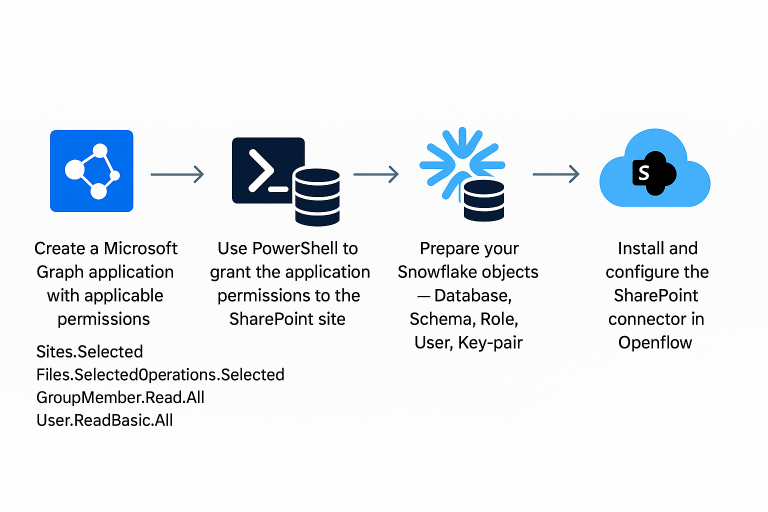
The Openflow feature can help to seamlessly access SharePoint’s files from within Snowflake.
Using Openflow to integrate SharePoint with Snowflake eliminates the need for manual uploads by establishing a secure, automated pipeline — just set up the connection, and let the files keep flowing!
Once ingested, files land in a Snowflake stage, ready to support a variety of use cases. For instance, you can:
- Build Retrieval-Augmented Generation (RAG) applications using SharePoint-sourced documents.
- Apply Cortex AI’s PARSE_DOCUMENT function to extract structured data from PDF or Word files.
Imagine editing a .docx file in SharePoint and seeing that update instantly reflected in Snowflake—real-time document intelligence at your fingertips. That's the awesome power of Openflow in Snowflake.
Openflow is a Snowflake service for data integration that has capabilities to connect to various data sources and destinations with several processors that supports structured and unstructured data. You can fully automate the processing of text, audio, images, video and other data formats.
Openflow
We have limitless capabilities from here to power our Retrieval-Augmented Generation (RAG) applications using SharePoint-sourced documents.